While the NSFW ban hurts marginalized folks looking to make a livelihood, or those just wanting get off, other legitimately harmful and hateful content continues to exist on the platform. A quick Tumblr search for the term “Nazi” brings up dozens of blogs run by fascists. In essence, Tumblr is sending a dangerous message to the world: Nazism isn’t as offensive as sex workers. Nazism isn’t as offensive as kink. Nazism isn’t as offensive as queer erotic art.
My blog is in the process of being imported in WordPress. It may take a while so I’m going to bed and I’ll see how it goes tomorrow. I’ll keep you posted. It may well be a huge fail but I had to try.
I’m not planning on moving out of Tumblr. It’s just a fail-safe.
So… It didn’t work for me. The takeaways from this (I hope) temporary hiccup:
Useful information here en(.)forums(.)wordpress(.)com / topic / tumblr – imports /
Don’t be a hothead like yours truly and cancel the import 6 hours in. It may take up to 24 hours before your whole blog is imported! If you tried cancelling and restarting the import yourself, you’re now stuck and you will need help from staff to reset it. Create a new thread in the forum as advised in the above post and add the tags modlook and tumblr import in your thread.
Read WP guidelines regarding mature content (also linked in the above post).
I’ll keep y’all posted whether I finally succeed or give up 😉
As a means of backing up your content (or content you reblogged, in my case), it’s OK. Not sure I will do anything much with that blog though.
In case you’re curious: somewhatavidreader(.)home(.)blog
Fair warning: I didn’t do any kind or customisation. This is the rough and ready outcome of importing from Tumblr to WP. The default theme I picked does not work well with the kind of posts I have.
FYI I also tried Tumblr export. It’s in your blog settings. The backup went through but I’m still unable to download the resulting Zip. It must be huge.
We at Piczel.tv are sad to see Tumblr’s stance against NSFW artists, and would like to offer up our services as an alternative to Tumblr’s arbitrary shadowbans, deletions, and general stupidity.
We’re happy to host adult artists who are looking for a new place to call home, and are planning a few key upgrades and features.
Effectively immediately though, our gallery upload size restriction has been removed, to be likely raised to 10MB in the near future for non-premium users.
As always, we support image sets, and don’t compress anything.
Firstly, for those that have been using tumblr as a portfolio, you’ll need a way to download all of your art, if you don’t have backups somewhere else. We are planning a tool for Piczel.tv that will import zip files full of images, including titles and descriptions if we are able.
Second, we’re planning the following upgrades to piczel in the coming weeks:
1. Bulk upload/import to your piczel.tv gallery 2. Gallery UI cleanup and improvements 3. Gallery performance improvements 4. Gallery comments with in line image and custom emote support 5. Site-wide PMs (in the vein of tumblr asks, but better) 6. Archive button for your piczel account
Don’t forget to follow us on twitter, we may be deleted on the 17th with everyone else. Until then, we’ll make posts here to keep everyone in the loop
Please consider reblogging this to help artists in need.
I noticed ^^ my dash has been doing fine so i was confused when people texted me saying they got notifications but couldn’t see the posts.
@weilongfu i contacted support…otherwise you can only wait i think….now that tumblr has reviewed and unflagged my posts, I hope I won’t get muted again down the line….
Actually, I should have realized this was an issue since @szabvero told me they were having trouble seeing my posts yesterday…
i dont really… WANT… to leave tumblr. ive been here since 2011
no other platform has the right format for me to just randomly barf actual thoughts, joaks, and genuine creative content all in the same breath. i dont know how to compartmentalize
every other platform you gotta be a real person. Here you are you’re icon and username and whatever your hyperfixation is at the current moment
I know there’s a lot of tension after Tumblr’s new policy annouced for December 17th, but reblog this if you aren’t leaving Tumblr so that other blogs can know they aren’t going to be completely alone!
My blog is in the process of being imported in WordPress. It may take a while so I’m going to bed and I’ll see how it goes tomorrow. I’ll keep you posted. It may well be a huge fail but I had to try.
I’m not planning on moving out of Tumblr. It’s just a fail-safe.
So… It didn’t work for me. The takeaways from this (I hope) temporary hiccup:
Useful information here en(.)forums(.)wordpress(.)com / topic / tumblr – imports /
Don’t be a hothead like yours truly and cancel the import 6 hours in. It may take up to 24 hours before your whole blog is imported! If you tried cancelling and restarting the import yourself, you’re now stuck and you will need help from staff to reset it. Create a new thread in the forum as advised in the above post and add the tags modlook and tumblr import in your thread.
Read WP guidelines regarding mature content (also linked in the above post).
I’ll keep y’all posted whether I finally succeed or give up 😉
Tumblr seems to be in potential death throes or at least, incredibly volatile and unreliable lately, but we’ve done some pretty good and informative work on canon analysis and reference guides so I was looking for ways to back it up without losing it…and the solution became obvious to me:
Archive of Our Own, aka AO3.
“What?” you might ask if you are less familiar with their TOS. “Isn’t that just a fanfic archive??”
No! It’s a fanWORK archive. It is an archive for fanworks in general! “Fanwork” is a broad term that encompasses a lot of things, but it doesn’t just include fanfic and fanart, vids etc; it also includes “fannish” essays and articles that fall under what’s often called “meta” (from the word for “beyond” or “above”, referencing that it goes beyond the original exact text)! The defining factor of whether Archive of Our Own is the appropriate place to post it is not whether or not it’s a fictional expansion of canon (fanfic), though that is definitely included – no, it’s literally just “is this a work by a ‘fan’ intended for other ‘fannish’ folks/of ‘fannish’ interest?”
The articles we’ve written as a handy reference to the period-appropriate Japanese clothing worn by Inuyasha characters? The analyses of characters? The delineations of concrete canon (the original work) vs common “fanon” (common misconceptions within the fandom)? Even the discussion of broader cultural, historical, and geographic context that applies to the series and many potential fanworks?
All of those are fannish nonfiction!
Which means they absolutely can (and will) have a home on AO3, and I encourage anybody who is wanting to back up similar works of “fannish interest” – ranging from research they’ve done for a fic, to character analyses and headcanons – to use AO3 for it, because it’s a stable, smooth-running platform that is ad-free and unlike tumblr, is run by a nonprofit (The OTW) that itself is run by and for the benefit of, fellow fans.
Of course, that begs the question of how to tag your work if you do cross-post it, eh? So on that note, here’s a quick run-down of tags we’re finding useful and applicable, which I’ve figured out through a combination of trial and error and actually asking a tag wrangler (shoutout to @wrangletangle for their invaluable help!):
First, the Very Broad:
– “ Nonfiction ”. This helps separate it from fanfic on the archive, so people who aren’t looking for anything but fanfic are less likely to have to skim past it, whereas people looking for exactly that content are more likely to find it.
– while “Meta” and “Essay” and even “Information” are all sometimes used for the kinds of nonfiction and analytical works we post, I’ve been told “ Meta Essay ” is the advisable specific tag for such works. This would apply to character analyses, reference guides to canon, and even reference guides to real-world things that are reflected in the canon (such as our articles on Japanese clothing as worn by the characters). The other three tags are usable, and I’ve been using them as well to cover my bases, but they’ll also tend to bring up content such as “essay format” fanfic or fanfic with titles with those words in them – something that does not happen with “Meta Essay”.
– I’ve also found by poking around in suggested tags, that “ Fanwork Research & Reference Guides ” is consistently used (even by casual users) for: nonfiction fannish works relating to analyses of canon materials; analyses of and meta on fandom-specific or fanwork-specific tropes; information on or guides to writing real-world stuff that applies to or is reflected in specific fandoms’ media (e.g. articles on period-appropriate culture-specific costuming and how to describe it); and expanded background materials for specific fans’ fanworks (such as how a given AU’s worldbuilding is supposed to be set up) that didn’t fit within the narrative proper and is separated out as a reference for interested readers.
Basically, if it’s an original fan-made reference for something specific to one or more fanworks, or a research aid for writing certain things applicable to fanworks or fannish interests in general, then it can fall under that latter tag.
– You should also mark it with any appropriate fandom(s) in the “Fandom” field. Just like you would for a fanfic, because of course, the work is specifically relevant to fans of X canon, right?
If it discusses sensitive topics, or particular characters, etc., you should probably tag for those. E.g. “death” or “mental illness”, “Kagome Higurashi”, etc.
Additionally, if you are backing it up from a Tumblr you may wish to add:
– “ Archived From Tumblr “ and/or “ Cross-Posted From Tumblr ” to reference the original place of publication, for works originally posted to tumblr. (I advise this if only because someday, there might not be “tumblr” as we know it, and someone might be specifically looking for content that was originally on it, you never know)
– “ Archived From [blog name] Blog ”; this marks it as an archived work from a specific blog. And yes, I recommend adding the word “blog” in there for clarity- Wrangletangle was actually delighted that I bothered to tag our first archived work with “Archived From Inu-Fiction Blog” because being EXTREMLY specific about things like that is super helpful to the tag wranglers on AO3, who have to decide how to categorize/”syn” (synonym) various new tags from alphabetized lists without context of the original posting right in front of them. In other words, including the name AND the word “blog” in it, helps them categorize the tag on the back end without having to spend extra time googling what the heck “[Insert Name Here]” was originally.
Overall, you should be as specific and clear as possible, but those tags/tag formats should prove useful in tagging it correctly should you choose to put fannish essays and articles up on AO3 🙂
Oh, and protip sidebar for those posting, especially works that are more than plain text: you can make archiving things quicker and easier for yourself, but remember to plan ahead for tumblr’s potential demise/disabling/service interruptions.
The good news: You can literally copy and paste the ENTIRE text of a tumblr post from say, an “edit” window, on tumblr, straight into AO3′s Rich Text Format editor, and it will preserve pretty much all or almost all of the formatting – such as bold, italics, embedded links, etc!
But the bad news: keep in mind that while AO3 allows for embedded images and it WILL transfer those embedded images with a quick copy-paste like that, AO3 itself doesn’t host the images for embedding; those are still external images. This means that whether or not they continue to load/display for users, depends entirely on whether the file is still on the original external server! As I quickly discovered, in the case of posts copied from the Edit window of a tumblr post, the images will still point to the copies of the images ON tumblr’s servers.
What this means is that you should back up (save copies elsewhere of) any embedded images that you consider vital to such posts, in case you need to upload them elsewhere and fiddle with where the external image is being pulled from, later.
Personally, I’m doing that AND adding image descriptions underneath them, just to be on the safe side (and in fairness, this makes it more accessible to people who cannot view the images anyway, such as sight-impaired people who use screen readers or people who have images set to not automatically display on their browser, so it’s win-win)
Thanks for this helpful guide! I haven’t used some of these tags so far for the fandom stats work I’ve cross-posted to AO3, but that’s because I didn’t know about them. Great ideas! 🙂
I keep meaning to mass archive my Toastystats work to AO3, but I am always stymied by image hosting when trying to overcome inertia and do so. It takes time to repost all the images to external hosting (like imgur). So thus far I’ve only done it for a few major analyses, and even in some of those cases, the images are hosted on Tumblr. But I should finally get around to it. At least I’ve exported my Toastystats side blog recently, so most of my stuff should be preserved if anything should happen. But maybe this holiday break I’ll finally make more progress.
I second all of this!
I’ve also found that AO3 is the best way for me to distribute my vids. I do have to host them elsewhere, but AO3 gives me a consistent URL and a way to have useful headers with fandom/ship/etc. even if I switch hosting a hundred times.
Okay, folks. So. Tumblr’s jumped the shark in a big way, and I’m not even just talking about indiscriminately blocking all “adult” content on a platform that IS, in fact, primarily 18+.
Many blogs, like the wonderful @blackkatmagic , that are not especially NSFW have vanished.
(And I for one LIKE being able to go to curated porn blogs run by actual people and have a chance of finding stuff to my taste, it was one of the things that kept me on this hellsite, but that’s another issue entirely.)
I know lots of people are talking about migrating, but none of us are sure to where yet. Pillowfort seems to be an option, some people are talking about Twitter. But for now, it’s a mess, and even if we knew where we were going, it’s often a huge process, and a lot of us have stuff on tumblr that ONLY exists there.
One possible quick solution to save your blogs, both NSFW and personal, is to import it to WordPress. I found this solution through from frantic googling on how to save an entire blog, text posts an all. There are several apps for downloading all the pictures from a tumblr, (Plently for Windows, but only a few paid ones for mac, of which Tumbelog Picture Downloader is working for me so far) but this is the only solution I’ve seen so far that allows you to save EVERYTHING. I downloaded my NSFW blog in like 10 min. My regular blog, which is significantly larger, is in the process of importing, but I don’t anticipate any problems. I will, of course, update you if I have any.
This tutorial I found worked really easily. http://quickguide (.) tumblr (.) com/post/39780378703/backing-up-your-tumblr-blog-to-wordpress
I put parenthesis around the .’s like we’re back in FF-Hell, just in case tumblr’s new thing about outgoing links kicks in. You know what to do.
To break it down, just in case:
Sign up for a WordPress.com account at wordpress (.) com/start
You’ll have to create an account, with your email, a username, and a password. They should send you a confirmation email immediately, check it, activate it, and you’re good to go.
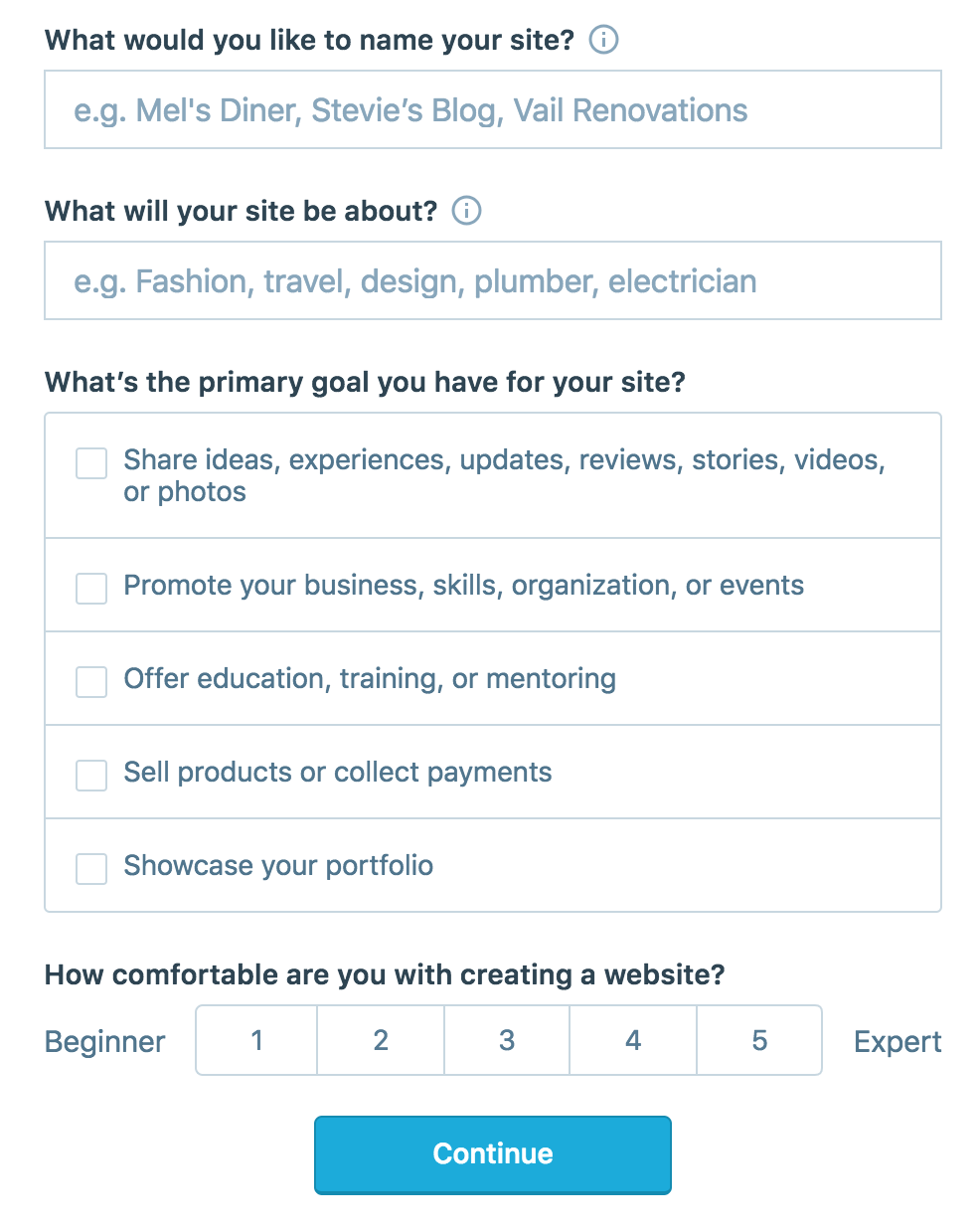
On the site, it will ask you for a site name. That page asks you a bunch of other information too, but you only have to fill out the site name.
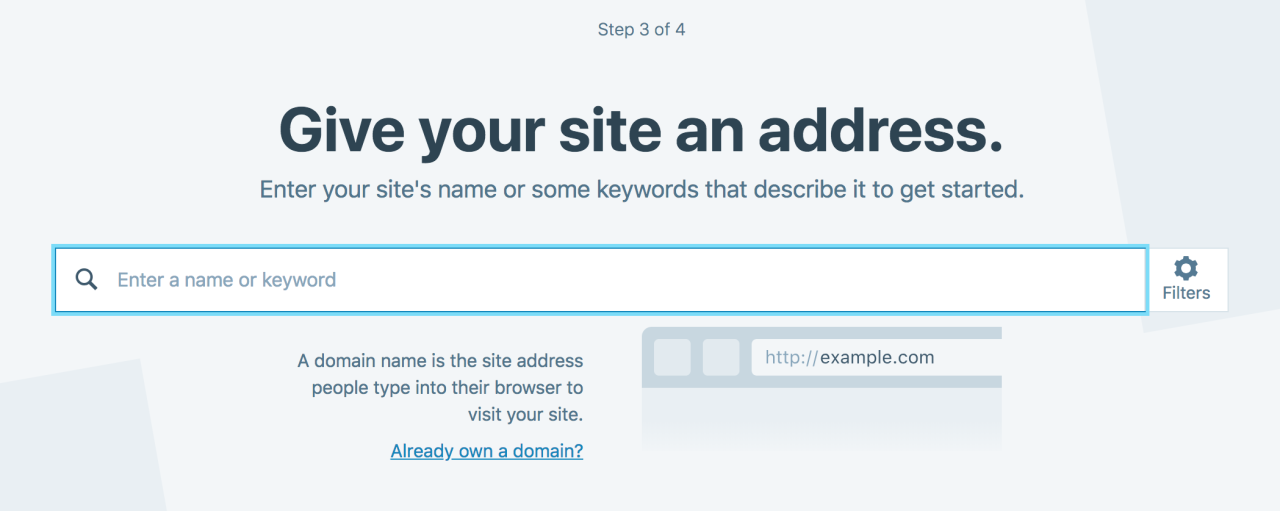
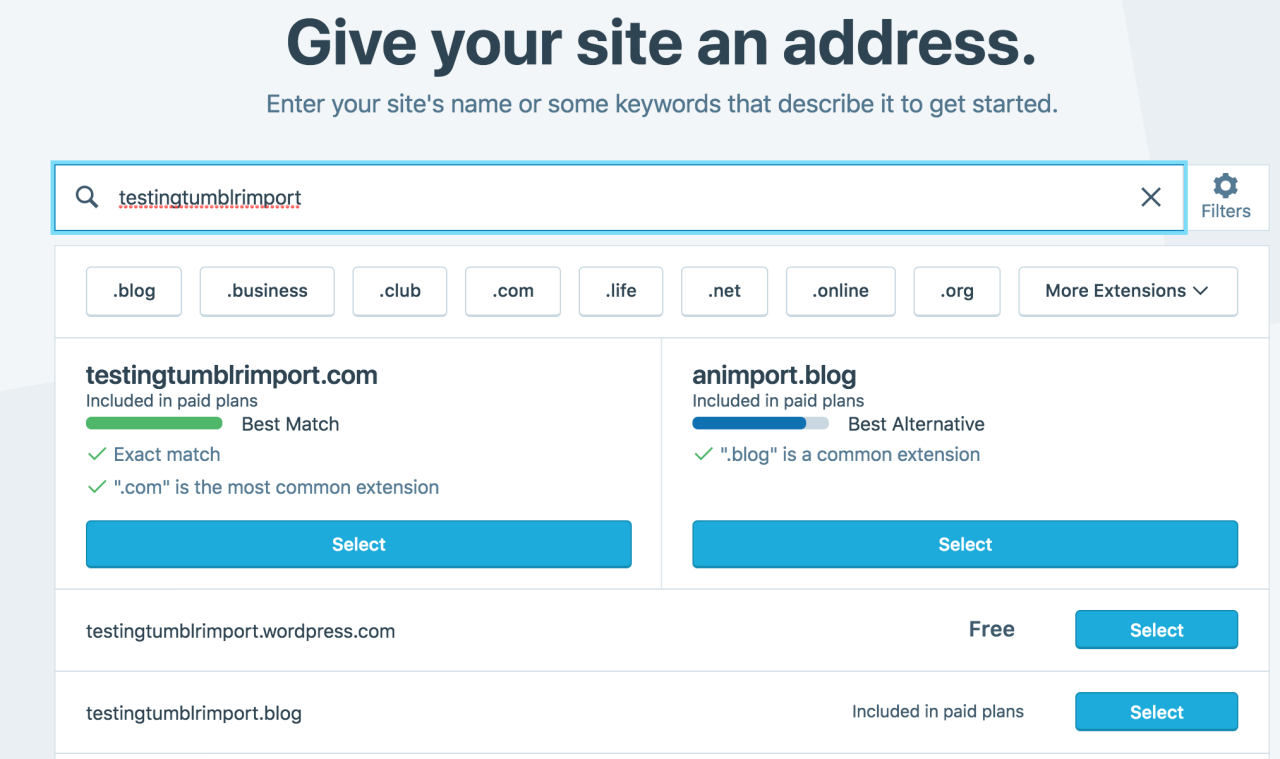
Then you have to give your site a URL. If you’re lucky, your tumblr URL is still available, if not you’ll have to come up with another one, sorry.
It will tell you if that option is still available for free.
Then it will ask you to pick a plan. Free is really good enough, I swear.
Now you’re set up! You can import your tumblr!
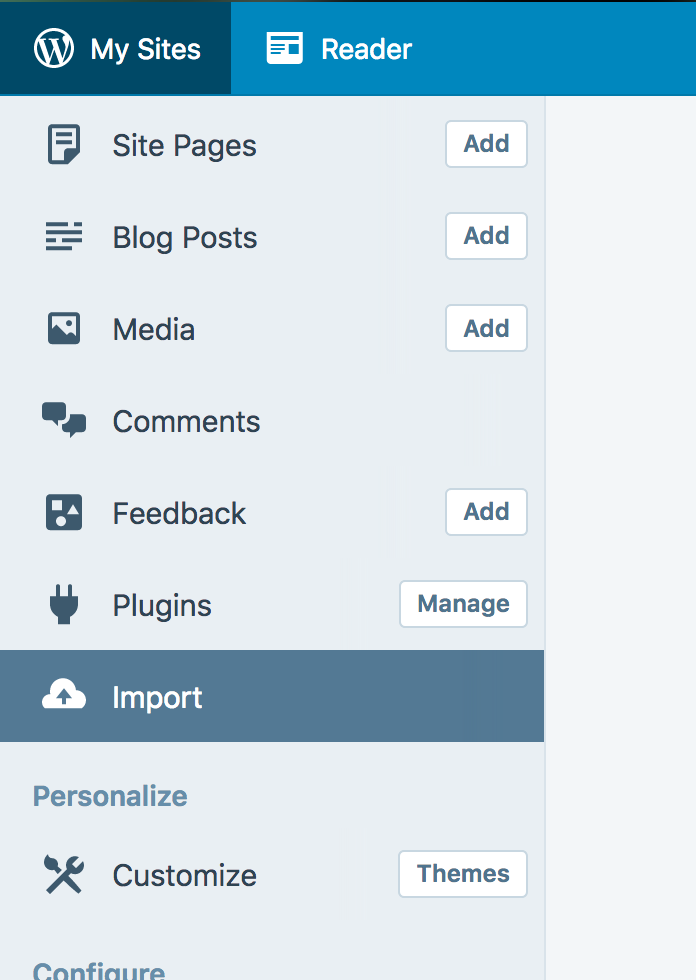
The only differences from the linked tutorial are that the Import button is now on the first level menu, not in tools.
Hit Import, then you have to follow the link for “other importers” at the bottom, to find the option for Tumblr.
Then you’ll have to sign in with tumblr, using your normal tumblr credentials. You’ll be redirected there automatically.
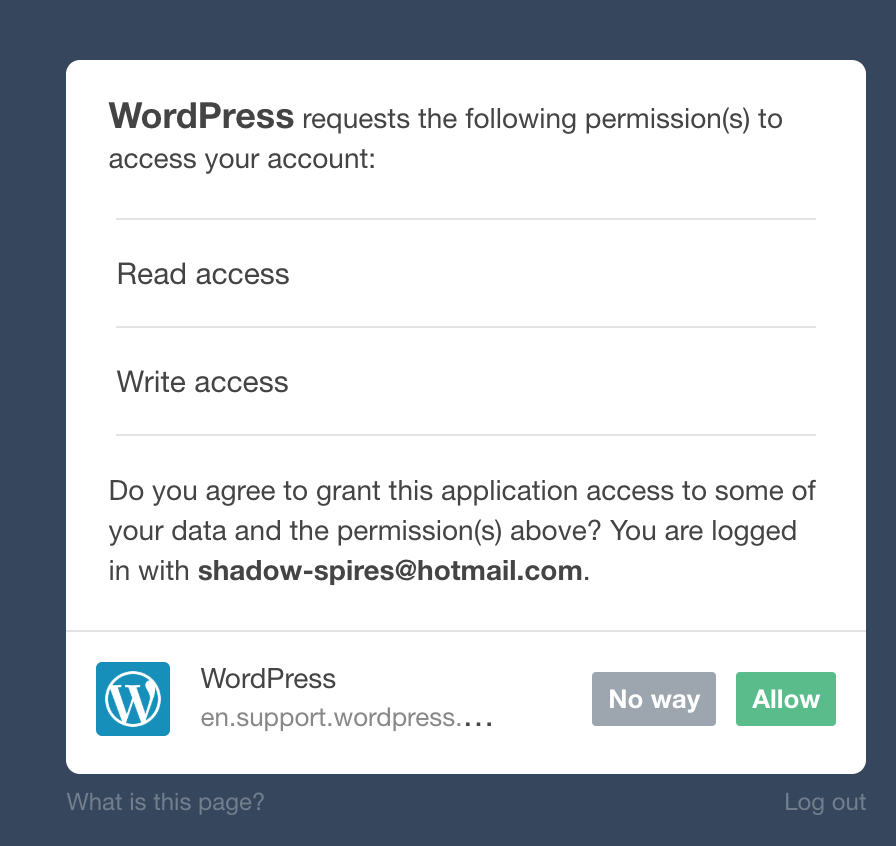
You’ll have to allow WordPress permissions on your blog.
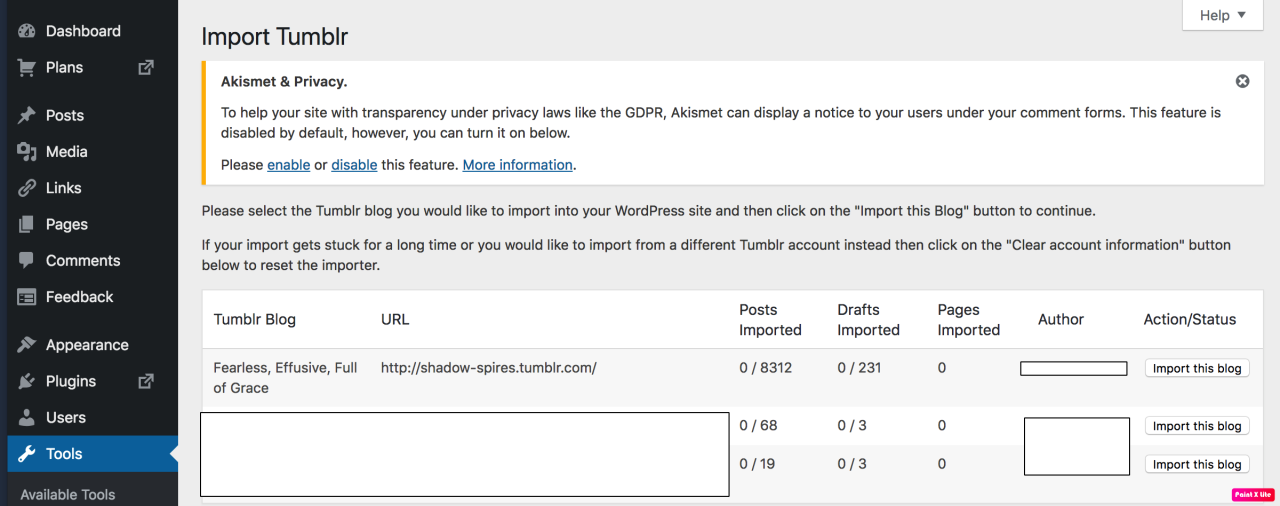
Then your blogs, including all your sideblogs, will show up in wordpress.
Hit import, wait a WHILE depending on the size of your blog, and you’re done!
ALSO!!
I made my NSFW blog private for now, since I don’t know WP’s policy on NSFW.
This means that to access it, someone has to have an account and request access. But hey, part of our problem on this hellsite has been people going places they aren’t wanted, so I don’t personally see this as a bad thing. They can send a request from the landing site on your blog, you get an email, click a link in the email, and PRESTO, they have access.
To make it private, go to Settings > Reading > Site Visibility. Go back and check, it took me changing the setting twice for it to actually stick.
tl;dr, you can import your entire blog to wordpress in just a few steps.
Edited almost immediately to add that WordPress allows posting reblogging, commenting, AND following, and so it seems like honestly the most logical next place for fandom in my opinion. It also allows a high degree of customization.
I’m going to tag the hell out of this, in no particular order. PLEASE reblog this and spread the word so people know it’s an option. If you’re having trouble, PM me, and I’m happy to help.
There are a whole bunch more, but that’s a start. Please reblog the hell out of this, so people are aware of this one simple option.
EDIT: We’re not sure yet about wordpress’ stance on NSFW, so definitely mark those blogs private for now. I had one person tell me they got nuked for one NSFW post on a 7 year old blog. Definitely look into other solutions for backing up your blog just in case Private isn’t good enough. There seem to be lots of options for Windows, including Python. A quick google search will turn up several. I’m still looking for a good option for Mac. Anyone know any?
Update on Migrating to WordPress
Back up your block somewhere else as well.
I’ve been forwarded the content guidelines for WordPress, and while they do allow nudity, they do not allow visually explicit pornography, not even drawings.
From their site:
We do permit mature content on WordPress.com, including text, images and videos that contain nudity, offensive language, and mature subject material. However, blogs that contain such content must be marked as Mature in our system.
If you are publishing a blog that you expect will contain content that is intended for mature audiences, we ask that you provide us the courtesy of reporting your blog or website here.
A blog or website that is marked as Mature is excluded from public areas of the WordPress.com service. This means:
• It will not appear in the Reader or other tag listings
• It will not appear in Top Blogs listings, recent posts, or related posts listings on other blogs
• The blog’s users cannot use that URL as a link in their WordPress.com Forums profile
Mature blogs and their owners are permitted to utilize all other aspects of WordPress.com. We do not suspend blogs solely for the presence of mature content and there are no interstitials or other “age gates” on WordPress.com.
However, there are limitations to the mature content permitted on our service. Please don’t:
• Post visual depictions of sexually explicit acts (such as, but not limited to, images, videos, and drawings) that can be considered pornographic;
• Post links or ads to adult-oriented affiliate networks, such as pornography site signups;
• Post links, text, or images promoting or advertising escort or erotic services;
• Post images of extreme violence or gore without associated context or commentary;
• Post images of child pornography;
• Post content that promotes pedophilia, such as blogs with galleries of images of children where the images, content surrounding the images, or the intent of the blog is sexually suggestive.
Blogs found to be hosting the above material will be suspended. In cases of child pornography, we will report all incidences to the National Center for Missing and Exploited Children and fully cooperate with law enforcement.
What does this mean?
I would hope that completely private blogs would not be flagged, but make sure that you back up your blog elsewhere, if it has any NSFW.
This seems not to include NSFW text, so fic should still be okay, but AO3 is really probably best for this.
WordPress is still an option for fic and fanart, but is probably not the best option for porn. (Even the excellently curated blogs that can be found on Tumblr. Am I bitter? Yes.)
Other options:
I’ve been seeing a lot of support for Dreamwidth. Though I don’t use it myself, it’s definitely a good option. Pillowfort is still inder construction and doesn’t seem to have a long term finance plan, but it’s probably worth getting an account and trying it out.
I haven’t found a good one for Mac yet, but I’m on the hunt.
Tumblr has a native export option, but I haven’t gotten it to work for me yet? Which doesn’t mean that it doesn’t work.
Mentioned problems:
Guys. This post has gotten over 14k notes in 4 hours. I’ve seen very few of the comments.
But some of them mentioned that they weren’t seeing the free option? I don’t know, guys, I still see it. Maybe it’s a country issue? Dreamwidth is absolutely free, if nothing else.
Not importing:
Again. 14k notes. I’m sure their servers are heavily overloaded. Be patient. Set up your computer somewhere plugged in and come back tomorrow. Mine is 4 hours into 8k posts and less than a ¼th of the way through. It’s gonna take a while.
There is also a petition up to change Tumblr’s mind on this situation.
Who knows if it would work, but it’s worth signing.
Does tumblr have a porn bot and actually illegal child porn problem? Yes.
Is the solution to that the nuke the blogs of a bunch of consenting adults? No.
Hopefully this is all a passing storm that will result in them getting their act together.
Am I hopeful? No. But it’s worth signing.
The Take away:
WordPress is a possible solution for text-based fandom, but it’s not the new tumblr.
DON’T PANIC, at the risk of plagiarizing Douglas Adams. Backup, protect your stuff, let people know where to find you, but don’t panic.
I’m personally gonna continue to use this site until it implodes, which it might not even do. It’s my main social media platform, and I do have some hope that they might pull their heads out of their asses.
Good luck everyone.
I’m tagging the hell out of this again, and I would really appreciate it if everyone could reblog this just as far as the previous one. I’ve tagged as many people as tumblr will let me XD
If you’re wanting to show your displeasure, don’t just tag staff or support. Take a page out of other consumer revolts and make sure your displeasure is known.
Don’t be an idiot. Do not threaten, harass or otherwise make this personal. Contact these companies, make your displeasure known, alert them that you are a customer and you will be leaving their brand across all boards unless they reverse their decision.
Be clear, be concise, be polite, but make your displeasure known.





 The Last Good Bar
You must be logged in to post a comment.